
July 03, 2025
Intermediate
Components
Amid HTML tags, attributes, styling with Flexbox and Grid, preprocessors like Sass or Less, and even the trendy TailwindCSS, the world of Front-End is vast and full of adventures. It's easy to get lost among so many tools. It seems like every semester a "new ReactJS" shows up, the darling of the moment that everyone wants to try out.
But no, that's not what we're going to talk about today. In fact, today's topic goes beyond all of that. Not in terms of complexity, but of concept. You don't need to know any of those tools to follow along. We're going to talk about components. What are they? When should you use them? And when shouldn't you (does that even exist?) Come with me!
Compo...what?
Let's understand the concept of Componentization. It's about splitting your code into small parts, the so-called Components. Each component represents a specific area of the screen, page, or functionality.
Think of it this way: when a factory builds a car, it doesn't do it all at once. First comes the body, then the wheels, the engine, and so on. A car is the sum of its parts. Each piece has its function, and together they make the car work.
Take a look below:
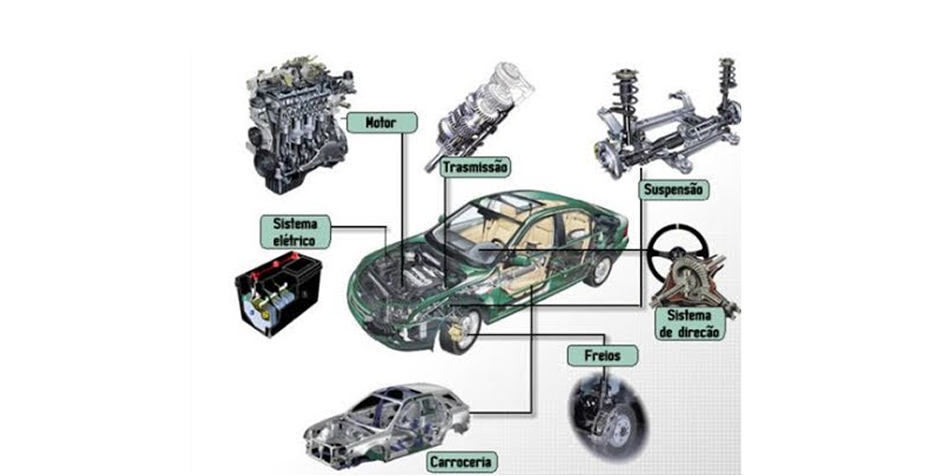
We have the engine, the suspension, the electrical system, the brakes, the steering, among others. Each part works independently, but when brought together, they make the car run. Get the idea?
And how does this translate to Front-End? Take a look at this example of a travel site landing page:

We could build this entire page in a single HTML file with CSS. But we could also split it into smaller parts, each one representing a specific component:
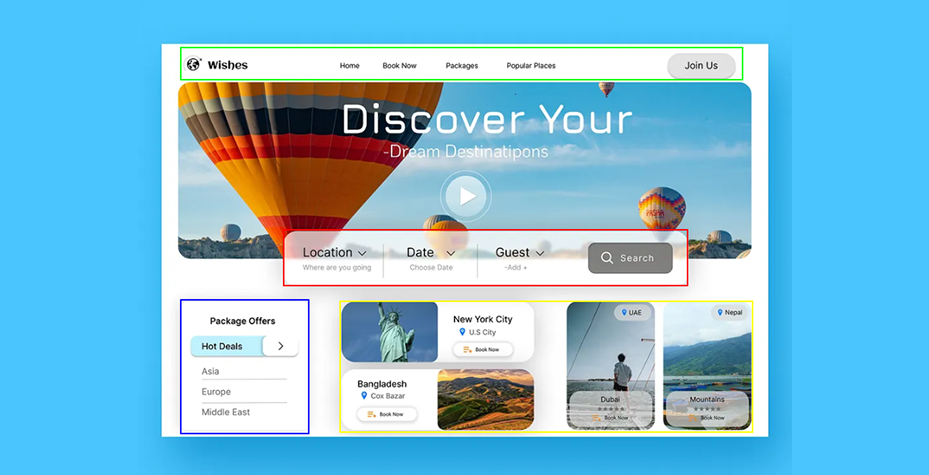
The image above shows how this page is organized into components, where each colored square would be a component:
- In blue, the site's offers.
- In red, the search bar, along with the page's filters.
- In yellow, the different available locations.
- In green, the page menu.
This is just one example of componentization; we could create plenty of other components and organize things in many different ways. But notice we have the same scenario as the car: different parts that make up the whole. Cool, right?
And why would I do this?
So, let me turn it back on you with another question: why would you NOT do this? Componentizing improves your application in several ways. Let's look at a few of them:
1. 🔀 Separation of concerns
You know that saying: "A tidy house, a peaceful life"? In front-end, that's worth its weight in gold.
When you break your page into components, you're basically organizing the mess. Instead of having a ton of code in a single file, you split everything into small blocks, each with one responsibility. This is called separation of concerns.
Imagine you're developing a travel booking site. It has the search form, the destination lists, the promotions, the top menu, footer, and so on. Now imagine trying to maintain all of that in a single file. A chaos, right?
Now, if you created a component for the search form, another for the destination listing, another for the main banner, it becomes easy. Want to change a button in the form? Go straight to its component. Want to add a new icon to the destinations? Go to the destination component. It's like working with neatly organized drawers instead of a box where you tossed everything together.
This separation also helps with mental focus (does that exist? well, it does now. lol). You don't have to keep 10 things in your head at the same time. You look at one component and solve the problem right there, without worrying about the rest of the world.
Pages with complex layouts or functionality are a good sign that you should componentize. Imagine developing the page below without componentization:
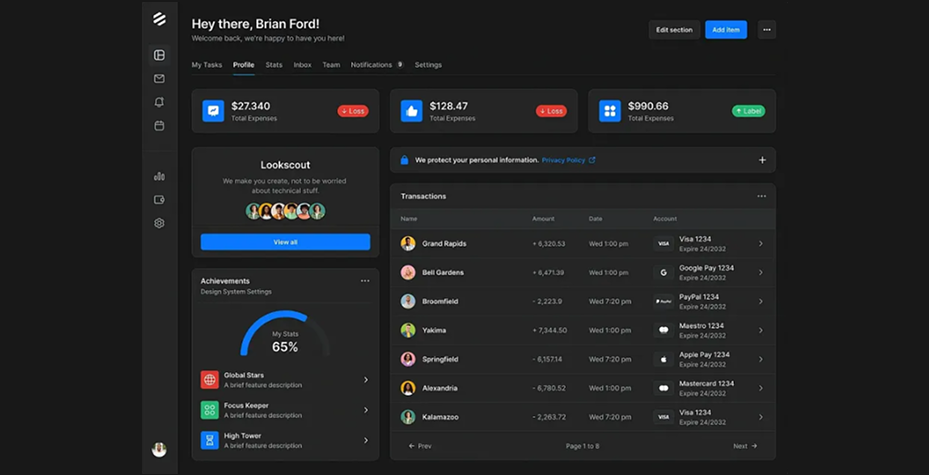
Can you picture it? If we apply the concept of componentization, this page becomes much simpler to understand and develop.
2. ♻️ Code reuse
You know when you write a snippet of code that turned out so neat, so just right, that you think: "I could use this somewhere else too"?
That's where the magic of reuse comes in.
Components let you create something that can be used in various parts of the application. For example, an alert box: you can make a component <Alert type="error" /> and reuse it anywhere you need to alert the user. You just change the color and the message. The rest is ready to go.
Or a pagination component, like we've seen. Instead of copying and pasting that block of HTML with 10 navigation buttons onto every listing page, you create a single pagination component and use it wherever you want with a simple <Pagination />.
This reduces repeated code, lowers the chance of bugs (because if you need to fix a behavior, you fix it in one place only), and makes your application much more consistent both visually and functionally.
Not to mention, your future self will thank you. One day you'll look at your own project and think: "I'm so glad I did this right."

Pagination component from the Angular Material component library. We could use it to display all the pagination details for every listing in our application. Click here to learn more.
3. 🛠️ Maintainability
Okay, your code is live, working just fine. But believe me: sooner or later, something will go wrong. Or else, someone will request a new feature. And then comes the question: how easy will that maintenance be?
Componentization is one of the best ways to ensure you'll be able to maintain your code without pulling your hair out.
Just think: if there's a bug in a user listing, and that listing is an isolated component, you go straight to the point. Now, if it's buried in an 800-line block of code along with 10 other features... good luck.
And remember the car example? If the vehicle stops working, the mechanic already knows where to look: engine, battery, fuel... because the car has an organized structure. The same applies here. Code organized into components helps you understand where the problem is and how to solve it without breaking the rest.
And it's not just bugs. Sometimes, maintenance means an improvement. Imagine the product team decided that now all "Buy" buttons should have a cart icon. If you have a buy button component, great. Go there, change the component, and all the buttons on the site already get the change. A touch of magic. Now... if you copied and pasted that button all over the place... 🤡
4. ✍️ Code readability
Now let's talk about something few people give due attention to, but that makes a huge difference: code readability.
Have you ever had to read code that looks like it was written by an ancient oracle from another dimension? Those giant files, with no indentation, with generic names like x1, data2, newFunction123... yeah.
Components help make your code cleaner, more semantic, and more readable. You look at the JSX (or HTML, or whatever you're using) and you immediately understand what each thing does. Instead of <div class="container"> with 30 children inside, you see something like:
return (
  <div>
    <Header />
    <SearchForm />
    <DestinationList />
    <Footer />
  </div>
);
Tell me: much easier to understand, right?
And this isn't just good for you. It's good for whoever works with your code later. Whether it's a teammate, a code reviewer, or even you 6 months from now (because yes, we forget).
In fact, if you're studying or just starting out in the field, this clarity even helps in the learning process. Well-named components help you understand the structure of the system without having to open a thousand files.
Conclusion
Throughout this article, we saw how components help bring more clarity, organization, and flexibility to front-end development. Splitting parts of the interface into well-defined blocks not only makes the code easier to read and maintain, but also makes everything more scalable, whether in small projects or in the largest applications of your career.
And of course, every project has its own timing and its own way of growing. Sometimes we start with everything in one place, gradually gain confidence, learn the patterns, and little by little notice where componentizing makes sense. It's a natural process, and each step in that direction helps a lot.
Now, if you've already seen the value in this approach and want to go further, there's a next step that's well worth getting to know: generic components. The ones that can be reused in many places, that receive different data, and adapt to the context without having to rewrite everything all over again.
In the next article, we'll talk about exactly that: how to create more flexible, reusable, and intelligent components. If this topic has already sparked your curiosity, stick around, good things are coming!
Post Author

Leonardo Henrique
Hey! I'm Leonardo Henrique, but a lot of people know me as "Leozinho do Front" — blame my passion for Front-End. I work as a Full Stack developer, with plenty of experience in Angular, a special fondness for React, and now venturing into Vue. I'm really into games and anime, and one day I still want to break into the games industry.